
Private Poker Room: Play with Friends Online
Want a home game when everyone is in different cities? In CC Poker, open a private poker room, send the room code, and play Texas Hold'em together on your phones.
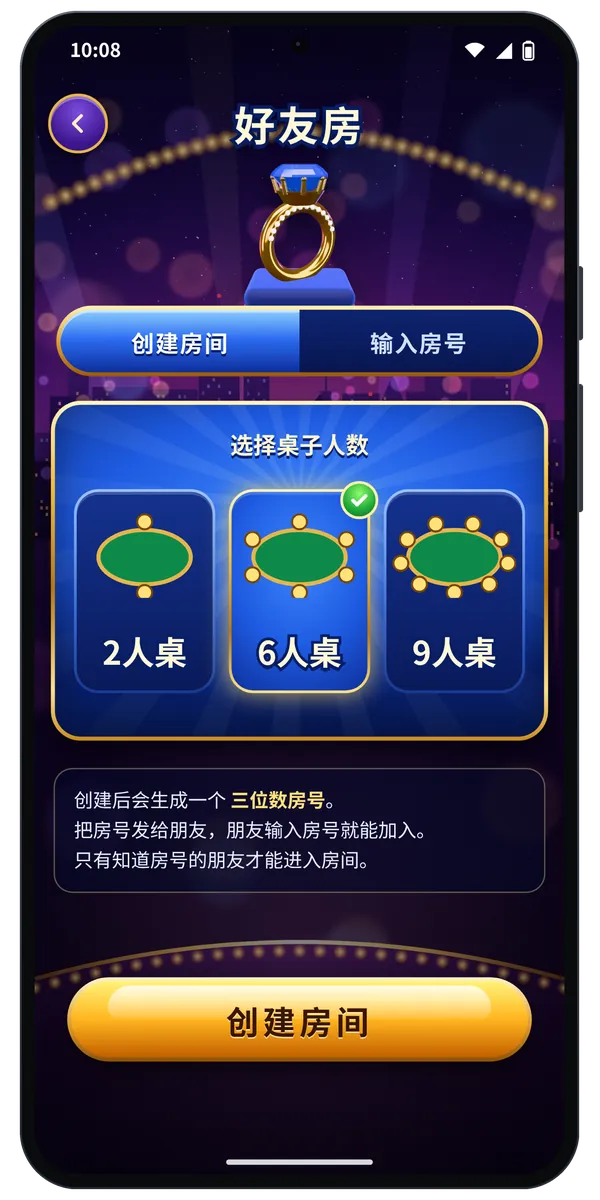
Open a private room in three steps
- Open CC Poker, go to Friends / Private Room, and choose Create.
- Pick table size: 2, 6, or 9 players. The app generates a three-digit room code.
- Share the code. Friends join by entering it. When the table is full enough, start dealing.
There is no public lobby list for these rooms — only people who know the code can find your table. That is what we mean by a private poker room.
Which table size fits
| Table | Best for |
|---|---|
| 2-max | Heads-up. Fast pace; good for a quick session. |
| 6-max | Small groups. More hands per person. |
| 9-max | Bigger friend groups, class chats, or parties. |
Home-game tips
- Agree on a time first: If friends are across cities or countries, pick a slot in chat, then create the room and send the code.
- Warm up if needed: New players can skim the rules overview and hand rankings before joining.
- Keep the code private: Treat the room code like a door key — only send it to people you want at the table.
Online with friends, still entertainment only
Chips in a private room are the same entertainment chips used elsewhere in the app. They cannot be exchanged for cash or goods. Do not settle results outside the app. CC Poker is for users aged 18 and over.